
Network Router User Manual

A-11
Cisco 7304 Router MIB Specifications Guide
OL-4925-02
Appendix A Using MIBs
Managing Router Physical Entities
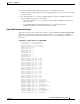
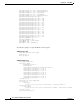
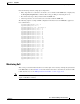
The following sample output illustrates a physical entity containment tree for a Cisco 7304 chassis
containing a Cisco 7304 NSE-100 daughter card.
entPhysicalTEntry.11
entPhysicalDescr.11 = Network Service Engine 100 Daughter Card
entPhysicalVendorType.11 = cevC7304Nse100Db
entPhysicalContainedIn.11 = 10
entPhysicalClass.11 = module(9)
entPhysicalParentRelPos.11 = 1
entPhysicalName.11 = Network Service Engine 100 Daughter Card 0
entPhysicalHardwareRev.11 = 5.0
entPhysicalFirmwareRev.11 =
entPhysicalSoftwareRev.11 =
entPhysicalSerialNum.11 = CAT07050DSN
entPhysicalMfgName.11 = Cisco Systems Inc
entPhysicalModelName.11 = 73-5673-07
entPhysicalAlias.11 =
entPhysicalAssetID.11 =
entPhysicalIsFRU.11 = false(2)
.
.
.
Monitoring and Configuring FRU Status
View objects in the CISCO-ENTITY-FRU-CONTROL-MIB cefcModuleTable to determine the
administrative and operational status of field replaceable units (FRU), such as power supplies and line
cards:
• cefcModuleAdminStatus—The administrative state of the FRU. Use cefcModuleAdminStatus to
enable or disable the FRU.
• cefcModuleOperStatus—The current operational state of the FRU.
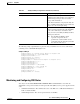
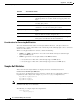
entPhysicalAssetID = This object is a user-assigned asset tracking
identifier for the physical entity as specified by a
network manager, and provides non-volatile
storage of this information.
On the first instantiation of an physical entity, the
value of entPhysicalAssetID associated with that
entity is set to the zero-length string.
entPhysicalIsFRU = true(1) This object indicates whether or not this physical
entity is considered a field replaceable unit (FRU)
by the vendor. This object contains the value
true(1), therefore, this entPhysicalEntry identifies
a field replaceable unit.
Note For all entPhysicalEntries which
represent components that are
permanently contained within a field
replaceable unit, the value false(2) should
be returned for this object.
Table A-3 entPhysicalEntry Configuration Information (continued)
entPhysicalTEntries
entPhysicalTEntry
Description