
Network Router User Manual

A-10
Cisco 7304 Router MIB Specifications Guide
OL-4925-02
Appendix A Using MIBs
Managing Router Physical Entities
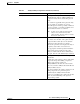
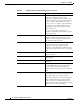
entPhysicalName = 7304 Chassis The textual name of the physical entity. The value
of this object should be the name of the
component as assigned by the local device and
should be suitable for use in commands entered at
the device console. This might be a text name,
such as `console' or a simple component number,
for example, port or module number, such as 1,
depending on the physical component naming
syntax of the device.
If there is no local name, or this object is
otherwise not applicable, then this object contains
a zero-length string.
entPhysicalHardwareRev = E The vendor-specific hardware revision string for
the physical entity. The preferred value is the
hardware revision identifier actually printed on
the component itself (if present).
entPhysicalFirmwareRev = The vendor-specific firmware revision string for
the physical entity. If no specific firmware
programs are associated with the physical
component, or this information is unknown to the
agent, then this object will contain a zero-length
string.
entPhysicalSoftwareRev =<user input> The vendor-specific software revision string for
the physical entity.
entPhysicalSerialNum = SCA070400D8 The vendor-specific serial number string for the
physical entity.
entPhysicalMfgName = Cisco Systems Inc The name of the manufacturer of this physical
component.
entPhysicalModelName = 73-5916-02 The vendor-specific model name identifier string
associated with this physical component. The
preferred value is the customer-visible part
number, which may be printed on the component
itself.
entPhysicalAlias = This object is an alias name for the physical entity
as specified by a network manager, and provides a
non-volatile handle for the physical entity.
On the first instantiation of an physical entity, the
value of entPhysicalAlias associated with that
entity is set to the zero-length string. However,
agent may set the value to a locally unique default
value, instead of a zero-length string.
Table A-3 entPhysicalEntry Configuration Information (continued)
entPhysicalTEntries
entPhysicalTEntry
Description