
User manual





9.0 MISCELLANEOUS
R599810 - Blackwing mk2012 User Manual 41
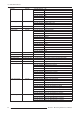
Available Operating commands
RCU Commands and sending them through RS-232
Header (21h) Command Data Description
Connection RS-232 00h 00h none Check the serial connection
Power ON 50h 57h 31h If the projector is in stand-by mode, this command
switch the unit ON.
Power OFF 50h 57h 30h If the projector is powered ON, this command
switches this unit into Stand-by Mode.
Switch Input 49h 50h 32h Switch active input to Component
33h Switch active input to VGA
36h Switch active input to HDMI 1
37h Switch active input to HDMI 2
2Bh Switch to next input
2Dh Switch to previous input
Test Patterns 53h 53h 54h 50h 30h 30h Test Patterns Off
30h 31h Color Cross Hatch
30h 32h Cross Hatch (White)
...
30h 39h Raster (White 50%)
30h 41h Raster (White 0%)
...
30h 46h Raster (Magenta 100%)
31h 30h Raster (Yellow 100%)
...
31h 39h Color Palette
Gamma 47h 54h 30h Set Gamma to Normal
31h Set Gamma to A
32h Set Gamma to B
33h Set Gamma to C
34h Set Gamma to Custom1
35h Set Gamma to Custom2
36h Set Gamma to Custom3
37h Set Gamma to D
41h Set Gamma to Film1
42h Set Gamma to Film2
43h Set Gamma to Film3
44h Set Gamma to Film4
Gamma Value
(Gamma set to
Custom1-3)
47h 50h 30h Set value to 1.8
31h Set value to 1.9
...
37h Set value to 2.5
38h Set value to 2.6
RCU code 53h 55h 52h 43h 30h Set Unit to receive commands from RCU code A
31h Set Unit to receive commands from RCU code B
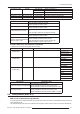
Header (21h) Command Data Description
Power ON 52h 43h 37h 33h 30h 35h Switch the unit ON
Power OFF 52h 43h 37h 33h 30h 36h Switch this unit into Stand-by mode
Switch input 52h 43h 37h 33h 30h 38h Switch to next input
37h 33h 34h 36h Switch active input to VGA
37h 33h 34h 44h Switch active input to Component
37h 33h 37h 30h Switch active input to HDMI 1
37h 33h 37h 31h Switch active input to HDMI 2