
User manual





5.0 CONNECTIONS
20 R599810 - Blackwing mk2012 User Manual
For input resolution and refresh rates, check the “Compatible resolutions”, page 47.
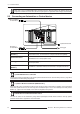
5.3 Connecting an Automation or Control device
Make sure to use a certified HDMI cable, especially when the distance between the different devices are
longer than 5 meters. If it is the case, the use of a split system or optical fiber cable is highly recommended.
Connection Device
RS-232C (*) Automation Device, Control Device or Computer with RS-232 capability.
Optional IR-receiver
Can be used to connect an external IR receiver when this unit is used in a
dedicated box or in rear projection setup.
12V Trigger
DC power supply output 12V@140-300mA to control either a screen or an
anamorphic slider.
LAN (**)
(BW2 & 3)
For BW2 & 3: automation Device, Control Device or Computer with RJ-45.
(*) USING RS-232 WITH A COMPUTER
The RS-232 Control and Automation may require specific software and tools. See “RS-232C protocol”, page 40 for
more details on RS-232 cabling and protocol.
(**) USING LAN WITH A COMPUTER (BW2 & 3 ONLY)
When the LAN Control is selected, the RS-232 port cannot be used for automation. In addition, the control device
must send specific functions to this unit using the Local Network (this is not a web interface) See “LAN protocol
(BW2 & 3)”, page 45 for more details on the network configuration and protocol.
CONNECTING AN AUTOMATION/CONTROL DEVICE
This unit can control or be controlled by using several input/output terminals. Each terminal is ruled by specific
protocols. Please refer to Appendix for more information.
LAN (**) to Rooter
Optional IR-reciever
12V Trigger
RS-232C (*)
for Automation
for Automation