
User manual





5.0 CONNECTIONS
R599810 - Blackwing mk2012 User Manual 19
5.0 CONNECTIONS
5.1 Caution when connecting a device to HDMI input
5.2 Connecting a Video Source to the Projector
Prior to connecting any device to this unit, switch the projector in standby mode. Never connect a HDMI
source to this unit when the projector is in operate mode. The HDMI termination is a self-powered
connection and can cause electric discharges.
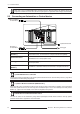
Connection Device
HDMI1, HDMI2
v1.4a with M3 lock hole
HDMI or DVI-D sources: Blu-Ray Disc player, DVD-player with HDMI, Game
Console, Computer with DVI-D output.
3D Synchro output
3d synchro emitter to control active shutter glasses. 3-PIN mini-DIN
interface, 12V.
YPbPr or RGB (3x RCA)
DVD-Player, HDTV Receiver, Game Console (SD or HD), DVB-T receiver,
Multimedia box, Analog Camera.
VGA (Sub D-15)
(BW2 & 3)
For BW2 & 3: Computer (VGA output), Multimedia box.
YPbPr
HDMI 2
HDMI 1
VGA
or
RGB
(Sub D-15)
3D Syncro
Emitter