
User manual





3.0 REMOTE CONTROL UNIT (RCU)
14 R599810 - Blackwing mk2012 User Manual
3.0 REMOTE CONTROL UNIT (RCU)
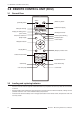
3.1 General View
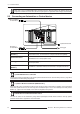
3.2 Loading and replacing batteries
• Push the cover tab with the fingernail a little backwards and pull upwards the cover top. Slide the cover forward
to remove.
• Push the battery body towards the spring and lift up to remove. Insert two AAA size batteries, making sure the
polarities match the + and - marks inside the battery compartment.
• Insert the lower tab of the battery cover in the gap at the bottom of the remote control, and press the cover until
it is firmly closed.
BACK
HIDE
LIGHT
ANAMO.
HDMI 1
3D
FORMAT
HDMI 2
COMP.
STAND BY
MENU
GAMMA
COLOR
P. F IL E
PICTURE MODE
INPUT
FILM
ON
COLOR
TEMP
PIC.
ADJ.
CINEMA ANIME
3D
NATURAL
STAGE
THX
USER C.M.D.
3D
SETTING
LENS
CONTROL
LENS
MEMORY
[Power On] button
Select Active [Input]
Display [Menu]
[Stand By] button
Select [3D Format]
[Anamo]rphic mode
[Back] to previous menu
Navigation buttons
Backlight button
Color Profile
Confirm button
[Lens control]
Shift, Focus and Zoom
[Hide] Display
Gamma Adj.
Color temp. Adj.
Basic Picture Adj.
Select a Picture Mode
Select a [Lens Memory]
Display [3D Setting] menu
Crystal Motion Drive