
Owner's Manual

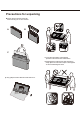




LIBERTY 1.5, ONN, RC254, MOCKUP
REV. DRAWN BYDESCRIPTION SHEETS REV’D
001
COPE-SUM MERFIELD
INITIAL MOCKUP
SHEET 1 OF 1
ALL
002
COPE-SUM MERFIELD
UPDATED PRINTED GRAPHIC COLOR ALL
060418
rev.002
*see cor r esponding AWRK for actual artwork size and placement
7
Remote Control Functions
Most of your television's functions are available on the menu that appear on the screen. The remote control
supplied with your set can be used to navigate through the menus and to configure all the general settings.
Note: The location and names of the buttons on the remote control may vary according to TV model, and not
all buttons are available on all models.
Sleep time
Rewind
Rewinds streaming video.
Scrolls left one page at a time.
5
6
1
10
8
2
3
4
5
6
7
9
11
12
13
14
# Button Description
Power
1
Back
Returns to the previous screen.
2
Directional keypad
3
Channel recall/jump back
Changes to the previous channel when viewing
antenna or cable (no set-top box) programming.
Jumps back one position in video when
viewing streaming content. Backspaces one
letter during menu entries, such as Search
.
4
Turn TV on and o.
(up, down, left and right direction buttons) Highlights dierent
items in the menu system and adjusts the menu controls.
OK/ENTER
Conrms your selection.
Set the TV to turn o after a given amount of time.