
Manual

8
16-Port Mini-SAS 6Gb/s Backplane 80H10331604A0 ver. A0
User’s Manual
15Fl., No.150, Jian Yi Road, Chung Ho City, Taipei Hsien, Taiwan R.O.C.,
Tel: +886 2 82265500 Fax: +886 2 82265392 Email: info@chenbro.com.tw
www.chenbro.com
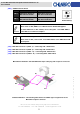
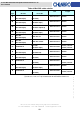
Pin Number Pin Signal
A8 Sideband 0 SClock
A9 Sideband 1 SLoad
A10 Sideband 2 Ground
B9 Sideband 3 Ground
B10 Sideband 4 SDataOut
B11 Sideband 5 SDataIn
A11 Sideband 6 Reserved
B8 Sideband 7 *SGPIO Enable / Disable
* The following table shows the SGPIO function which is related to the setting of SW1.
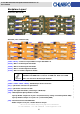
HDD Status Indictor LED
Backplane Assembly
SW-1 SW-2 SGPIO Pin B8 Signal
On On Enable HDD failure and access signal via SGPIO Low
On Off Enable HDD access signal via SGPIO Low
Off On Enable HDD failure signal via SGPIO Low
Off Off Disable HDD failure and access signal via SGPIO High
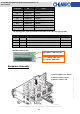
1. Insert backplane into chassis
2. Attach 3 screws on back.
3. Attach 1 screw on side.
Blue LED On - HDD Power On
Green LED On - HDD active
Red LED On - HDD failure