
User Manual





16
4.5.5. DISPLAY
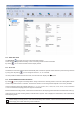
By clicking , then opening the Thermometer tab, you can modify the units in which the measurements are displayed in the
same way as by pressing the or °C/°F or TYPE keys.
4.5.6. ALARM
By clicking , then opening the Alarms tab, you can program an alarm threshold in each of the measurement channels. The
alarm may be triggered if the measurement is:
above a high threshold,
below a low threshold,
between 2 thresholds,
above the high threshold or below the low threshold
4.5.7. RECORDING WITH AN ALARM CONDITION
You can program recording to be triggered only when an alarm threshold is crossed ( ). The instrument then records the meas-
urements for the programmed duration.
To make sure that no crossing of an alarm threshold can be missed, the instrument can no longer be switched off when this is done.
4.5.8. READING THE RECORDS
The Data Logger Transfer software lets you read the records made. Click Recorded Sessions under the name of your instrument
to obtain a list of the records.
4.5.9. EXPORTING RECORDS
Once the list of the records is displayed, choose the one you want to export and convert it into a word-processing document (docx)
or a spreadsheet (xlsx), in order to be able to use it in the form of reports or curves.
It is also possible to export the data to the DataView application software (see §1.2).
4.5.10. REAL-TIME MODE
Click Real-time data under the name of your instrument to see the measurements being made on the instrument as they are made.