
Owner manual




28
The following list shows the according command mode command syntax and their usage.
• help – Displays the list of possible commands
• cls – Clears the screen
• quit – Exists the current session and disconnects from the client
• version – Displays the release information
• terminal – Starts the terminal passthrough mode for serial port 1. The key sequence esc exit
switches back to the command mode.
3.2 Remote Power Control
CPI PDUs are not compatible with the Remote Power Control function which requires a serial
connection between the KVM and a PDU. CPI PDUs have their own IP console, connect directly
to the network and are accessed directly using a web browser.
3.3 Virtual Media
The Virtual Media menu provides several ways to share data with the servers attached to the IP
KVM Switch from the remote system that is accessing the servers using the IP console.
3.3.1 Floppy Disk – Upload a Floppy Image
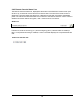
Click the Virtual Media button and then the Floppy Disk button to upload a floppy image.
Virtual Media Floppy Disk Screen