
Specifications






OSD Menu
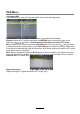
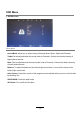
6. SETUP menu
Description
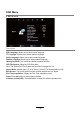
OSD Language: Allows you to select menu language.
TT Language: Allows you to select teletext language.
Audio Language: Allows you to select audio language.
Subtitle Language: Allows you to select subtitle language.
Hearing Impaired: Turn on/off the Hearing Impaired function.
PVR File System: Setup the PVR file system.
Note: The options PVR File System are described on pages 22 -23.
Aspect Ratio: Choose from 4:3, 16:9, Zoom1, Zoom2, Full Screen(potit to invot).
Blue Screen: Turn on/off the blue screen function when there’s no signal.
First Time Installation: Display the First Time Installation menu.
Reset: Press OK button to restore factory default.
Software update(USB):
Press OK button to enter the software update menu.
18