
Specifications






channel by buttons.
OSD Menu
Programme Edit
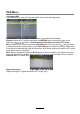
Press OK button to enter the Programme Edit menu as the following picture.
Rename: Select an ATV channel and press the GREEN button to change the name of the
Move:
Select an ATV channel, and press YELLOW button, then you can use and buttons
to change the position of the program, press YELLOW again to confirm the change. Press menu
to exit and it will automatically save the current set.
Skip: Select a channel and press the BLUE button to label the channel, as long as the channel
has a skip label it will be skipped when searching through the channels with the CH+/- buttons.
Signal Information
Display the digital TV-signal information (DTV mode only).
Delete: Select a channel and press RED button, the program will be deleted.
Note:Rename function does not work in DTV mode.
Note:Move function only works in DTV mode
when default country is selected.
Schedule list (DTV mode only)
Hint---you should operate according to the hint.
12