
Instructions / Assembly




10
Installation (continued)
10
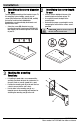
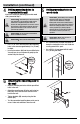
Attaching the bracket assembly
to the TV (VESA 200x200,
400x200, 400x400, NON-VESA)
CAUTION: Do not overtighten the screws as
this could damage your TV.
□ Attach the bracket assembly to the back of your TV
using the appropriately sized screws (DD) and
washers (EE). Follow one of the configurations in the
images in this step, depending on TV type.
11
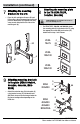
Mounting the TV to the bracket
CAUTION: Use two or more people to
complete this step.
□ Attach the mounting plate to the slot on the mounting
arm.
□ Insert the safety screw (HH) through the end of the
mounting arm and into the back of the TV.
□ Adjust the TV to the desired angle by moving the
mounting arm 180° to the left or right.
□ In order to adjust the tilt, tighten or loosen the screw
(1) in the very front of the arm with your fingers.
C
DD
VESA
400x200
VESA
200x200
NON VESA
VESA
400x400
EE
HH
180˚
HH
1