
User`s manual




User’s Manual
24
• MANUAL
In this focus mode, users can adjust the focus speed, ranging from 0 ~ 3.
After completing setup of focus, go back to the Main Page 1 and continue to set
the AE mode.
3.3.5 AE MODE
The exposure is the amount of light captured by the image sensor and is determined
by the width of lens diaphragm opening (iris adjustment), the amount of exposure by
the sensor (shutter speed) and other exposure parameters. This option allows users
to define how the Auto Exposure (AE) function works.
18×/26× Model:
• EXPOSURE COMPENSATION
The exposure value rages from -10.5dB ~ 10.5dB. Select <OFF> to disable
the function.
• AE MODE
AUTO
In this mode, the camera’s Brightness, Shutter Speed, IRIS and AGC (Auto
Gain Control) control circuits work together automatically to get consistent
video output level.
BRIGHT
The brightness control function adjusts the IRIS and AGC gain using an
internal algorithm. Brightness is controlled by gain when the light condition is
dark and by iris when the light condition is bright. The bright value ranges
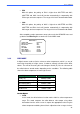
MAIN PAGE 1
LANGUAGE ENGLISH
DEFAULT CAMERA ON
BACKLIGHT OFF
FOCUS AUTO
AE MODE AUTO
WBC MODE AUTO
SETUP MENU 1 ENTER
SETUP MENU 2 ENTER
FOCUS SPEED 0
TURNING VALUE 10CM