
User Manual


3
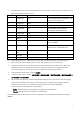
• The following shows input switching instruction and input switching query parameters and
their corresponding input sources.
Parameter
Input Source
Computer Terminal Setting
Remarks
11
Computer1
Auto
On the XJ-F21XN ,XJ-F211WN, the
input source is Computer
12
Computer1
RGB
“
13
Computer1
Component
“
14
Computer2
Auto
XJ-UT312WN, XJ-UT352WN,
XJ-S400UN, XJ-S400WN only
15
Computer2
RGB
“
16
Computer2
Component
“
21
Video
31
HDMI1
On the XJ-UT312WN, the input
source is HDMI
32
HDMI2
XJ-F21XN,XJ-F211WN,XJ-UT352WN
, XJ-S400UN, XJ-S400WN only
43
CASIO USB
Tool
44
Network
45
Template
• Image only mute is not supported by the AV mute instruction and AV mute state query
• The cover open error and filter error are not supported by the error state query.
• A projector name query returns the projector name specified on the Web Service Page. For
information about the Web Service Page, see "Using a Computer to Configure Projector
Network Settings" in your Projector's user's guide (Network Function Guide).
• A manufacturer name query returns CASIO.
• A device name query returns XJ-F21XN / XJ-F211WN / XJ-UT312WN / XJ-UT352WN /
XJ-S400UN / XJ-S400WN .
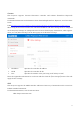
• The password used for the connection authentication process is the same as the Setup page
password on the Web Service Page. The Projector can be configured to enable or disable
authentication. To do so, use [Network Settings]-[Network Settings]-[PJLINK
Authentication] on the Projector's Setup Menu.
Eable: PJLink connection authentication enabled. (Initial default)
Disable: PJLink connection authentication disabled.
For information about the functions of other commands, see the PJLink specifications issued by
JBMIA.