
User Manual
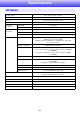
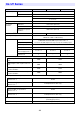
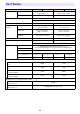
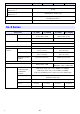
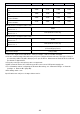

Table Of Contents
- Contents
- Safety Precautions
- Operating Precautions
- Getting Ready
- Unpacking
- Operation Flow to Projection
- General Guide
- Key and Indicator Panel
- Back Terminals
- Placing the Projector on a Desk or on the Floor
- Connecting with Another Device
- Connecting a Computer
- Connecting to a Video Device
- Outputting Audio from the Projector to Another Device
- Connecting a Microphone (XJ-UT Series, XJ-F21XN, XJ-F211WN, XJ-S400UN, XJ-S400WN)
- Connecting to a Network with a LAN Cable (Network Models Only)
- Connecting a Wireless Adapter (Network Models Only)
- LOGO Terminal (Firmware Updates, User Logo Transfers)
- Connecting a Scientific Calculator (Network Models Only)
- SERIAL Terminal (Projector Control Using Commands)
- USB Power
- Cover Included with the YW-41 Wireless Adapter
- Attaching and Removing the Cable Cover (XJ-UT Series)
- Remote Controller
- Operating the Projector
- Turning the Projector On or Off
- Selecting an Input Source (INPUT)
- Using Auto Projection Off
- Basic Image and Audio Operations During Projection
- Flipping the Projected Image Horizontally (Mirror Mode)
- Light Control
- Digital Screen Shift
- Projecting a Template
- Test Pattern Projection
- Control Panel Lock
- Configuring Remote Control ID and Projector ID Settings
- Using the Countdown Timer (TIMER)
- Using the Presentation Timer (TIMER)
- Using the Setup Menu (MENU)
- Using a Password
- Cleaning the Projector
- Troubleshooting
- Appendix
- Supplying USB Power to Another Device
- Mounting the Projector on a Wall (XJ-UT Series)
- Hanging the Projector from a Ceiling
- Using the MONITOR OUT Terminal (XJ-UT Series, XJ-S400UN, XJ-S400WN)
- Projection Distance and Screen Size
- Aspect Ratio Setting and Projection Image
- Supported Signals
- Projector RS-232C Control
- Specifications

92
Specifications are subject to change without notice.
Power Consumption (100 to 240V)
Light Output 7 when “Light Control” is
“On”
210W 215W 210W 215W
Light Output 1 when “Light Control” is
“On”
120W 125W 120W 125W
When “Bright” is selected for “Light
Control Off Mode”
250W 255W 250W 255W
When “Normal” is selected for “Light
Control Off Mode”
215W 220W 215W 220W
Standby Power Consumption (100 to 120V)
When “Disable” is specified for
“Remote On” *
5
0.09W
When “Enable” is specified for
“Remote On” *
5
0.6W (Network models only)
Standby Power Consumption (220 to 240V)
When “Disable” is specified for
“Remote On” *
5
0.17W
When “Enable” is specified for
“Remote On” *
5
0.8W (Network models only)
Approximate Dimensions 357 (W) × 337 (D) × 124 (H) mm (14.1" × 13.3" × 4.9")
(not including projections)
Approximate Weight 5.9kg (13.0lbs)
*1 When the “Light Control Off Mode” setting is “Bright”. ISO 21118:2012 standard.
*2 Shows overall average value when the projector is shipped from the factory. This type of entry is
governed by ISO 21118:2012 data projector specifications. Measurement methods and conditions
are based on Appendix B.
*3 Plug-in power type microphones are not supported.
*4 With a network model, the USB Host port also serves as a USB power supply port.
*5 For information about configuring the Remote On setting, see “Network Settings 3 Network
Settings 3 Remote On” (page 66).
*6 Excluding cable cover.
Model Name XJ-S400U XJ-S400UN XJ-S400W XJ-S400WN