
User Manual
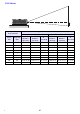
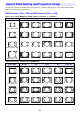
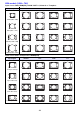
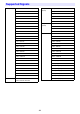
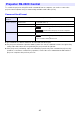
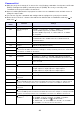
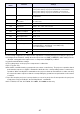
Table Of Contents
- Contents
- Safety Precautions
- Operating Precautions
- Getting Ready
- Unpacking
- Operation Flow to Projection
- General Guide
- Key and Indicator Panel
- Back Terminals
- Placing the Projector on a Desk or on the Floor
- Connecting with Another Device
- Connecting a Computer
- Connecting to a Video Device
- Outputting Audio from the Projector to Another Device
- Connecting a Microphone (XJ-UT Series, XJ-F21XN, XJ-F211WN, XJ-S400UN, XJ-S400WN)
- Connecting to a Network with a LAN Cable (Network Models Only)
- Connecting a Wireless Adapter (Network Models Only)
- LOGO Terminal (Firmware Updates, User Logo Transfers)
- Connecting a Scientific Calculator (Network Models Only)
- SERIAL Terminal (Projector Control Using Commands)
- USB Power
- Cover Included with the YW-41 Wireless Adapter
- Attaching and Removing the Cable Cover (XJ-UT Series)
- Remote Controller
- Operating the Projector
- Turning the Projector On or Off
- Selecting an Input Source (INPUT)
- Using Auto Projection Off
- Basic Image and Audio Operations During Projection
- Flipping the Projected Image Horizontally (Mirror Mode)
- Light Control
- Digital Screen Shift
- Projecting a Template
- Test Pattern Projection
- Control Panel Lock
- Configuring Remote Control ID and Projector ID Settings
- Using the Countdown Timer (TIMER)
- Using the Presentation Timer (TIMER)
- Using the Setup Menu (MENU)
- Using a Password
- Cleaning the Projector
- Troubleshooting
- Appendix
- Supplying USB Power to Another Device
- Mounting the Projector on a Wall (XJ-UT Series)
- Hanging the Projector from a Ceiling
- Using the MONITOR OUT Terminal (XJ-UT Series, XJ-S400UN, XJ-S400WN)
- Projection Distance and Screen Size
- Aspect Ratio Setting and Projection Image
- Supported Signals
- Projector RS-232C Control
- Specifications

85
To control the projector using RS-232C commands from a computer, you need to connect the
projector and computer using a commercially available serial cable (cross).
Command Send Format
All commands use ASCII characters and decimal format integers.
The projector will return a question mark (?) when it is sent a command it cannot recognize. Any
setting value that cannot be recognized by the projector will be ignored.
If the projector is performing a process initiated by a previously sent command, a projector key
operation, or a remote controller key operation, send of the next command must wait until the
projector completes the previous process.
Projector RS-232C Control
Communication
Protocol
Data Rate: 19200 bps, Data Bit: 8 bit, Parity: None, Stop Bit: 1 bit, Flow Control: None
Read Command Send Format (<command name>?)
Receive Format (<applicable command setting range>,<current setting>)
Command Send Example sent from the computer to the projector.
4
returned from the projector to the computer.
Write Command Send Format (<command name><setting value>)
Command Send Example sent from the computer to the projector.
4
Projector volume setting becomes 0.
(
VOL ?
)
(
0
-
30,15
)
(
VOL 0
)