
User Manual

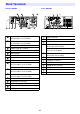
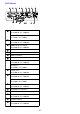
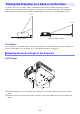
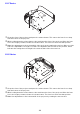
Table Of Contents
- Contents
- Safety Precautions
- Operating Precautions
- Getting Ready
- Unpacking
- Operation Flow to Projection
- General Guide
- Key and Indicator Panel
- Back Terminals
- Placing the Projector on a Desk or on the Floor
- Connecting with Another Device
- Connecting a Computer
- Connecting to a Video Device
- Outputting Audio from the Projector to Another Device
- Connecting a Microphone (XJ-UT Series, XJ-F21XN, XJ-F211WN, XJ-S400UN, XJ-S400WN)
- Connecting to a Network with a LAN Cable (Network Models Only)
- Connecting a Wireless Adapter (Network Models Only)
- LOGO Terminal (Firmware Updates, User Logo Transfers)
- Connecting a Scientific Calculator (Network Models Only)
- SERIAL Terminal (Projector Control Using Commands)
- USB Power
- Cover Included with the YW-41 Wireless Adapter
- Attaching and Removing the Cable Cover (XJ-UT Series)
- Remote Controller
- Operating the Projector
- Turning the Projector On or Off
- Selecting an Input Source (INPUT)
- Using Auto Projection Off
- Basic Image and Audio Operations During Projection
- Flipping the Projected Image Horizontally (Mirror Mode)
- Light Control
- Digital Screen Shift
- Projecting a Template
- Test Pattern Projection
- Control Panel Lock
- Configuring Remote Control ID and Projector ID Settings
- Using the Countdown Timer (TIMER)
- Using the Presentation Timer (TIMER)
- Using the Setup Menu (MENU)
- Using a Password
- Cleaning the Projector
- Troubleshooting
- Appendix
- Supplying USB Power to Another Device
- Mounting the Projector on a Wall (XJ-UT Series)
- Hanging the Projector from a Ceiling
- Using the MONITOR OUT Terminal (XJ-UT Series, XJ-S400UN, XJ-S400WN)
- Projection Distance and Screen Size
- Aspect Ratio Setting and Projection Image
- Supported Signals
- Projector RS-232C Control
- Specifications

30
Use a conveniently located power outlet that you can reach easily when you need to unplug the
projector.
Airflow from air conditioning equipment can blow the heat being exhausted from the area around
the projector’s lens in a way that causes heat ripples to appear in the projected image. If this
happens, adjust the airflow of the air conditioning equipment or move the projector.
XJ-UT Series
Maintain a distance of at least 6 cm (2.4 inches) between the front of the projector (from which light
is being emitted) and the projection surface (screen). Maintain a distance of at least 30 cm
(11.8 inches) between surfaces and the other sides of the projector. There should be no other
objects within the above distances from the projector. Particular care is required to keep objects
away from projector air intake and exhaust openings.
XJ-F Series/XJ-S Series
Do not located any objected within 30 cm (11.8 inches) around the projector. Particular care is
required to keep objects away from projector air intake and exhaust openings.
Setup Precautions