
User Manual


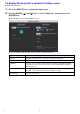

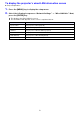
Table Of Contents
- Contents
- Establishing a Network Connection Between the Projector and a Computer
- Establishing a Direct Wireless LAN Connection Between a Computer and the Projector
- Using a Wired LAN Connection to Connect the Projector to an Existing Network
- Connecting the Projector to an Existing Wireless LAN Access Point
- Using the Projector as a NAT Router (Simultaneous Use of Wireless LAN and Wired LAN)
- Using the Remote Controller to Configure Projector Network Settings
- Using a Computer to Configure Projector Network Settings
- Preparing for C-Connection
- Network Projecting a Computer Screen Image (Using C-Connection)
- C-Connection Details
- Advanced Operations
- Controlling the Projector from an External Network Device
- Ports Used for TCP/UDP

7
To display the projector’s network standby screen
Projector Operation
1.
Press the [INPUT] key to display the input menu.
2.
Use the [INPUT], [S], and [T] keys to select “Network”, and then press the
[ENTER] key.
This displays the network standby screen.
The information that appears on the screen is explained below.
This item: Shows this:
File name File name of this projector’s One Click Connection file (page 32)
Projector name This projector’s name (page 30)
IP Address This projector’s IP address. When using both a wireless LAN and wired LAN
connection (page 13), this item shows the wireless LAN IP address (LAN2 IP
address, page 27).
Login Code This projector’s login code (page 23). This item is displayed when “Fixed” or
“Random” is selected for the “Login Code Options” setting.
Projector SSID This projector’s SSID.
B