
User Manual


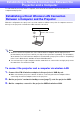

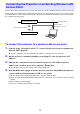
Table Of Contents
- Contents
- Establishing a Network Connection Between the Projector and a Computer
- Establishing a Direct Wireless LAN Connection Between a Computer and the Projector
- Using a Wired LAN Connection to Connect the Projector to an Existing Network
- Connecting the Projector to an Existing Wireless LAN Access Point
- Using the Projector as a NAT Router (Simultaneous Use of Wireless LAN and Wired LAN)
- Using the Remote Controller to Configure Projector Network Settings
- Using a Computer to Configure Projector Network Settings
- Preparing for C-Connection
- Network Projecting a Computer Screen Image (Using C-Connection)
- C-Connection Details
- Advanced Operations
- Controlling the Projector from an External Network Device
- Ports Used for TCP/UDP

6
Establishing a Network Connection Between the
Projector and a Computer
To start network projection from a computer, there must be a network connection between the
computer and projector.
With this configuration, the projector is used as a wireless LAN access point. A computer connects
directly to the projector via a wireless LAN network connection.
Note
Wireless connection requires use of the YW-41 wireless adapter, which may have been
provided with your projector or which you may need to purchase separately. For information
about whether or not the wireless adapter is included with your projector, refer to “Unpacking”
in the User’s Guide that is available from the CASIO website.
You can have up to eight computers and/or smart devices connected to a single projector at
the same time over a wireless LAN.
To connect the projector and a computer via wireless LAN
1.
Connect the YW-41 wireless adapter to the projector’s USB-A port.
Make sure that the projector is turned off before connecting the wireless adapter. After
connecting the wireless adapter, turn on the projector.
2.
On the projector’s network standby screen (page 7), note the projector SSID.
3.
On the computer, connect to the projector SSID via wireless LAN.
Establishing a Direct Wireless LAN Connection
Between a Computer and the Projector
Projector
Wireless LAN connection