
User Manual



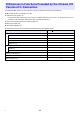


Table Of Contents
- Contents
- Establishing a Network Connection Between the Projector and a Computer
- Establishing a Direct Wireless LAN Connection Between a Computer and the Projector
- Using a Wired LAN Connection to Connect the Projector to an Existing Network
- Connecting the Projector to an Existing Wireless LAN Access Point
- Using the Projector as a NAT Router (Simultaneous Use of Wireless LAN and Wired LAN)
- Using the Remote Controller to Configure Projector Network Settings
- Using a Computer to Configure Projector Network Settings
- Preparing for C-Connection
- Network Projecting a Computer Screen Image (Using C-Connection)
- C-Connection Details
- Advanced Operations
- Controlling the Projector from an External Network Device
- Ports Used for TCP/UDP

48
The Chrome OS version of C-Connection does not have the functions listed below.
One Click Connection (pages 32, 36)
Favorites List* (page 37)
* The Chrome OS version does not have a separate Favorites List screen. To view projectors you
registered as Favorites, display the Auto Search Results List.
Projector search by projector name (page 39)
Hot Keys (page 46)
PC Remote (page 53)
Some functions on the Preferences dialog box (See the table below.)
Differences in Functions Provided by the Chrome OS
Version of C-Connection
Item c: Available ×: Not available
General Tab (page 45) c
User name c
Allow control inputs from receivers ×
Mute PC audio when projecting ×
Always on Top c
Favorites Tab (page 45) c
Default List ×
Favorites List c
Advanced Tab (page 46) ×
HotKey Tab (page 46) ×
About Tab (page 46) c
B