
User Manual


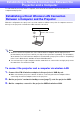

Table Of Contents
- Contents
- Establishing a Network Connection Between the Projector and a Computer
- Establishing a Direct Wireless LAN Connection Between a Computer and the Projector
- Using a Wired LAN Connection to Connect the Projector to an Existing Network
- Connecting the Projector to an Existing Wireless LAN Access Point
- Using the Projector as a NAT Router (Simultaneous Use of Wireless LAN and Wired LAN)
- Using the Remote Controller to Configure Projector Network Settings
- Using a Computer to Configure Projector Network Settings
- Preparing for C-Connection
- Network Projecting a Computer Screen Image (Using C-Connection)
- C-Connection Details
- Advanced Operations
- Controlling the Projector from an External Network Device
- Ports Used for TCP/UDP
4
Differences in Functions Provided by the Chrome OS Version of
C-Connection .......................................................................................48
Advanced Operations ................................................... 49
Using the Moderator Function .............................................................49
To use a computer to control projection from multiple terminals .............................. 49
To use the remote controller to control projection from multiple terminals ................ 51
Projector Remote .................................................................................52
To perform projector operations from a computer.................................................... 52
Remotely Controlling a Computer from a Smart Device
(PC Remote) .........................................................................................53
To start PC Remote................................................................................................. 53
To exit PC Remote .................................................................................................. 54
Template Pattern Customization..........................................................54
To add or delete a template image .......................................................................... 55
To rename a folder .................................................................................................. 56
Network Administrator Appendix
Controlling the Projector from an External Network
Device............................................................................. 58
Ports Used for TCP/UDP .............................................. 59