
User Manual


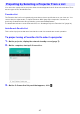
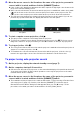
Table Of Contents
- Contents
- Establishing a Network Connection Between the Projector and a Computer
- Establishing a Direct Wireless LAN Connection Between a Computer and the Projector
- Using a Wired LAN Connection to Connect the Projector to an Existing Network
- Connecting the Projector to an Existing Wireless LAN Access Point
- Using the Projector as a NAT Router (Simultaneous Use of Wireless LAN and Wired LAN)
- Using the Remote Controller to Configure Projector Network Settings
- Using a Computer to Configure Projector Network Settings
- Preparing for C-Connection
- Network Projecting a Computer Screen Image (Using C-Connection)
- C-Connection Details
- Advanced Operations
- Controlling the Projector from an External Network Device
- Ports Used for TCP/UDP

37
You can select a projector for projection from a list that appears in the C-Connection window. There
are two types of list, described below.
Favorites List
The Favorites List is a list of network projectors that you have specified as ones you often use. You
can use the procedure under “To import Favorites data” (page 34) to import the contents of a
previously-created Favorites file provided by your network administrator.
For details about how to create a Favorites list, see “Creating a Projector Favorites List” (page 33).
Auto Search Results List
This is a list of projectors that were found as the result of a network auto search operation.
To project using a Favorites list to select a projector
1.
On the projector, display the network standby screen (page 7).
2.
On the computer, start up C-Connection.
3.
On the C-Connection list panel that appears, click .
Projecting by Selecting a Projector From a List