
User Manual

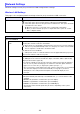

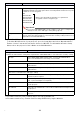
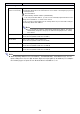

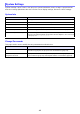
Table Of Contents
- Contents
- Establishing a Network Connection Between the Projector and a Computer
- Establishing a Direct Wireless LAN Connection Between a Computer and the Projector
- Using a Wired LAN Connection to Connect the Projector to an Existing Network
- Connecting the Projector to an Existing Wireless LAN Access Point
- Using the Projector as a NAT Router (Simultaneous Use of Wireless LAN and Wired LAN)
- Using the Remote Controller to Configure Projector Network Settings
- Using a Computer to Configure Projector Network Settings
- Preparing for C-Connection
- Network Projecting a Computer Screen Image (Using C-Connection)
- C-Connection Details
- Advanced Operations
- Controlling the Projector from an External Network Device
- Ports Used for TCP/UDP

30
System Settings can be used to view projector system information, and to change login passwords
and other settings (Moderator function user list screen display settings, Crestron control settings).
System Info
Change Passwords
This page can be used to modify the two passwords described below.
System Settings
This item: Shows this:
Model Name “casiolpj”
Wireless LAN Access Point SSID Projector SSID (Access Point Mode only)
Projector name Projector name
Firmware version Firmware version of the projector’s network system
MAC Address (Wired LAN) MAC address (physical address) of the wired LAN board of the projector
MAC Address (Wireless LAN) MAC address (physical address) of the wireless adapter connected to the
projector. The following will be shown if the wireless adapter is not connected
to the projector: -- : -- : -- : -- : -- : --.
Password Purpose
Admin Password Login password for the Projector Setup page (page 20). This password also is
used when logging into the projector from a PJLink device (page 58).
Moderator/Projector Remote/
Template Password
Login password for the following function pages: Moderator (page 49),
Projector Remote (page 52), and Template Pattern Customization (page 54).