
User Manual

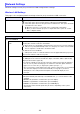

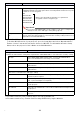
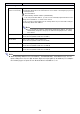

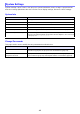
Table Of Contents
- Contents
- Establishing a Network Connection Between the Projector and a Computer
- Establishing a Direct Wireless LAN Connection Between a Computer and the Projector
- Using a Wired LAN Connection to Connect the Projector to an Existing Network
- Connecting the Projector to an Existing Wireless LAN Access Point
- Using the Projector as a NAT Router (Simultaneous Use of Wireless LAN and Wired LAN)
- Using the Remote Controller to Configure Projector Network Settings
- Using a Computer to Configure Projector Network Settings
- Preparing for C-Connection
- Network Projecting a Computer Screen Image (Using C-Connection)
- C-Connection Details
- Advanced Operations
- Controlling the Projector from an External Network Device
- Ports Used for TCP/UDP

28
Note
When inputting addresses for “IP Address”, “Default Gateway”, and “DNS Server”, do not
input leading zeros for one-digit and two-digit octets (xxx parts of an address). For example,
the following types of input are not allowed: 029 for 29, 005 for 5, etc.
Use this item: To do this:
LAN1 IP Settings
LAN1 IP Settings
(Auto if not checked)
Specify whether to use a manually specified fixed IP address or an IP address
automatically obtained from an external DHCP server when connecting the projector to
an existing network.
: Fixed IP address
: Automatically obtain IP address (initial default).
If you are using a fixed IP address, you also need to manually input information for the
settings from “IP Address” to “DNS Server” below.
You do not need to input anything for the settings below if you selected the setting to
automatically obtain an IP address.
Note
If you selected the setting to automatically obtain an IP address, the values
automatically assigned to the projector will not be displayed for the setting
items below.
IP Address Input a fixed projector IP address of the format below.
xxx.xxx.xxx.xxx (Initial Default: 192.168.100.1)
Subnet Mask Input a subnet mask of the format below.
xxx.xxx.xxx.xxx (Initial Default: 255.255.255.0)
Default Gateway Input a default gateway IP address of the format below.
xxx.xxx.xxx.xxx (Initial Default: 192.168.100.10)
DNS Server Input a DNS server IP address of the format below.
xxx.xxx.xxx.xxx (Initial Default: 192.168.100.10)