
User Manual

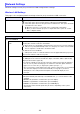

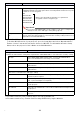
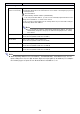

Table Of Contents
- Contents
- Establishing a Network Connection Between the Projector and a Computer
- Establishing a Direct Wireless LAN Connection Between a Computer and the Projector
- Using a Wired LAN Connection to Connect the Projector to an Existing Network
- Connecting the Projector to an Existing Wireless LAN Access Point
- Using the Projector as a NAT Router (Simultaneous Use of Wireless LAN and Wired LAN)
- Using the Remote Controller to Configure Projector Network Settings
- Using a Computer to Configure Projector Network Settings
- Preparing for C-Connection
- Network Projecting a Computer Screen Image (Using C-Connection)
- C-Connection Details
- Advanced Operations
- Controlling the Projector from an External Network Device
- Ports Used for TCP/UDP

27
Network Settings
This page is for specifying the projector name and IP address.
This projector has two IP addresses, which are described in the table below. These IP addresses need
to be specified in accordance with the type of network connection being used.
LAN1 IP Address
The projector IP address when connecting the projector to an existing network. It corresponds to the
IP addresses described below.
Wired LAN IP address when connecting the projector to an existing network using a wired LAN
IP address when the projector is connected wirelessly to an existing network in the Client Mode
(page 25)
You can select either a fixed IP address or auto acquisition of IP address depending on the type of
network being connected with. Network settings that need to be configured are those shown for
“Network Settings” 3 “LAN1 IP Settings” (page 28).
LAN2 IP Address
The projector IP address when connecting a computer by wireless LAN to a projector that is in the
Access Point Mode (page 24).
Network settings that need to be configured are those shown for “Network Settings” 3 “LAN2 IP
Settings” (page 29).
Use this item: To do this:
Projector name Specify a projector name (Initial Default: casiolpj000).
The “000” part of the SSID are the final three digits of the MAC Address (Wired LAN)
(unique product number, page 30).
If you want to manually input a projector name, input a character string up to 16
characters long into this input box. You can use numerals or alpha characters (upper
case or lower case).
B