
User Manual


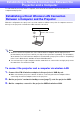

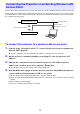
Table Of Contents
- Contents
- Establishing a Network Connection Between the Projector and a Computer
- Establishing a Direct Wireless LAN Connection Between a Computer and the Projector
- Using a Wired LAN Connection to Connect the Projector to an Existing Network
- Connecting the Projector to an Existing Wireless LAN Access Point
- Using the Projector as a NAT Router (Simultaneous Use of Wireless LAN and Wired LAN)
- Using the Remote Controller to Configure Projector Network Settings
- Using a Computer to Configure Projector Network Settings
- Preparing for C-Connection
- Network Projecting a Computer Screen Image (Using C-Connection)
- C-Connection Details
- Advanced Operations
- Controlling the Projector from an External Network Device
- Ports Used for TCP/UDP

10
Use the procedure in this section to connect the projector to an operating wireless LAN access point.
Connecting the computer to the same wireless LAN access point as the projector or to a hub, router,
or another device on the same network as the projector will establish a network connection between
the computer and projector.
To connect the projector to a wireless LAN access point
1.
Perform steps 1 through 3 under “To connect the projector and a computer via
wireless LAN” (page 6).
Use the computer connected via wireless LAN to configure projector settings.
2.
On the projector’s network standby screen (page 7), note the projector’s IP
address.
3.
Start up the computer’s browser, input the projector’s IP address into the
address bar, and then press the computer’s [Enter] key.
This displays the projector’s Web Service page (page 18).
4.
Use the Web Service page to put the projector into the Client Mode (required to
connect with an external wireless LAN access point).
(1) On the Web Service page window title bar, click the [Setup] button.
(2) Input the password (Initial Default: admin) into the “Password” box, and then click the [Login]
button.
(3) Click “Wireless LAN Settings”.
(4) Select the “Enable Client Mode” check box.
Connecting the Projector to an Existing Wireless LAN
Access Point
Wireless LAN connection
Existing network
Wireless LAN or
Wired LAN connection
Wireless LAN access point
Projector
C