
User manual - EX100_M29_FB





110
Advanced Settings (REC MENU)
NOTE
• Assigning functions to the up/down keys disables their normal [8] (DISP) function
(which changes the monitor screen contents) and [2] ( ) function (which
changes the flash setting).
• The same function cannot be assigned to multiple controllers (keys, control dial).
• Depending on the recording mode, some functions may not be assignable to the
Control Dial.
Procedure
Enter the REC Mode * [MENU] * “
r
REC MENU” Tab *
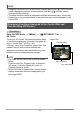
EX Finder
Turning on “EX Finder” will cause the setting items
of the functions assigned to function ring (page 46)
and to “Control Dial”, “L/R Key” and
“U/D Key” using “Key Customize” (page 109). This
makes it easy to find out what functions are
assigned to the control dial and function ring, and
makes it easier to change camera settings.
NOTE
• EX Finder can be used in the recording modes
below.
Premium Auto Pro, Program Auto, A (Aperture
AE) mode, S (Shutter Speed AE) mode, M
(Manual Exposure) mode
• While EX Finder is enabled (On), monitor screen
display information does not change when you
press [8] (DISP).
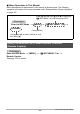
Displaying Functions Assigned to the Control Dial and
Function Ring (EX Finder)
Up, down keys
Control Dial
Function Ring
Left, right keys