
User manual - EW-B2000C_WB



119
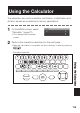
Using the Calculator
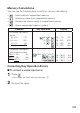
The calculator can perform addition, subtraction, multiplication and
division, as well as constant and memory calculations.
1
On the MENU screen, select
“Calculator” (page 27).
This displays the calculator
screen.
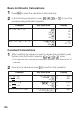
2
Perform the operations described on the next page.
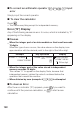
After the calculation is complete, exit the calculator screen by pressing
.
Calculator keyboard
•
•
Using the CalculatorUsing the Calculator