
Software Starter Guide (For the Canon Digital Camera Solution Disk Version 27)






Wireless Network Settings for the Computer and Camera
86
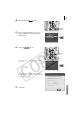
3 After you have selected a target device, select
[Connect].
The name registered for the target device in Step
11 (p. 81, 83) in Registering the Target Device
with the Camera will appear in the [Target Device]
category.
4 Press the button (or F
FUNC./SET
button).
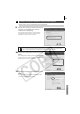
The wireless lamp and button will blink
while the two devices connect.
The LCD monitor will display an indicator that
shows the connection status.
When the camera connects to the computer, the
wireless lamp will stop blinking and light steadily.
An antenna showing the signal strength will
appear in the LCD monitor. (0-3 bars)
You cannot connect to multiple target devices at once. If you are already
connected to one device and attempt to connect another, the current
connection will close and the camera will begin to connect to the new target
device.
• Unless you change the target device, you can connect later simply by pressing
the button in Step 2 for one second.
• "If an error message displays on the camera's LCD monitor, see the
Connection Difficulty topic in the Wireless Connection Troubleshooting
section (p. 100).
Button
FUNC./SET
Button
In Playback Mode