
Software Starter Guide (For the Canon Digital Camera Solution Disk Version 27)






83
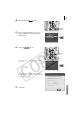
9 Select [I do not have an access point, but my
computer is compatible with wireless
networks] and click [Next].
This window will not appear if the wireless
configuration information is automatically
detected. Proceed to the next step.
10 Confirm the configuration settings and click
[Next].
The configuration settings will automatically take
effect and appear in the window. These settings
generally do not require adjusting.
11 Confirm the displayed information and click
[Next].
The name you entered here will display in the
camera's "Connect to" category.
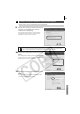
1:1 Direct Connection between Camera and Computer
Perform steps 1-8 (pp. 78-80) before proceeding below.
If you do not understand the terminology in the window, place the mouse cursor
over it. A brief explanation will display at the bottom of the window.
B