
Software Starter Guide (For the Canon Digital Camera Solution Disk Version 27)






79
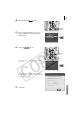
4 Press the camera's M
MENU
button.
5 Select the [ (Wireless)] menu in the
camera's LCD monitor and choose [Reg.
Target Device].
6 Press the F
FUNC./SET
button.
"Input data on PC" will appear on the camera's
LCD monitor.
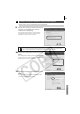
The Camera Wireless Setup utility, as shown to
the right, will start up. Set the wireless settings in
this window.
7 Click [Next].
MENU
Button
FUNC./SET
Button