
Software Starter Guide (For the Canon Digital Camera Solution Disk Version 27)





Using the Software on the Macintosh Platform – Advanced Techniques
70
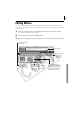
The My Camera Window
ImageBrowser already contains several pre-recorded My Camera settings items. You can check
these items with the My Camera window.
Type
Select the settings type.
Displays the list
of settings files
saved onto the
computer.
Play Button
Plays the audio from the
selected settings file.
Send to Trash Button
Deletes a settings file
from the computer.
Save to Camera Button
Click here to save the
settings onto the
camera.
Delete Button
Deletes a settings
file from the
camera.
Displays the
settings in the
camera.
Play Button
Plays the audio from
the settings file in the
camera.
Save to Camera
Save to Computer