
PowerShot SD430 DIGITAL ELPH WIRELESS/DIGITAL IXUS WIRELESS Camera User Guide Basic






14
Printing
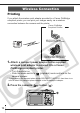
If you attach the wireless print adapter provided to a Canon PictBridge
compliant printer, you can print your images easily via a wireless
connection between the camera and the printer.
1.
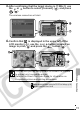
Attach a compact power adapter to the supplied
wireless print adapter to connect it to a Canon
PictBridge compliant printer.
• Turn the printer on.
• Slide the mode switch to (playback) mode and turn on the
camera’s power.
* If you are using the compact photo printer SELPHY CP710/CP510, then there is no
need to attach the compact power adapter to the wireless print adapter.
2.
Press the camera’s button ( ).
Wireless Connection
Canon PictBridge
Compliant Printers
SELPHY CP Series
Compact Photo Printers
PIXMA Series/SELPHY DS
Series Bubble Jet Printers
Camera