
PowerShot SD430 DIGITAL ELPH WIRELESS/DIGITAL IXUS WIRELESS Camera User Guide Basic






9
Shooting
Using the Flash
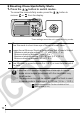
1.
Press the button to cycle through flash settings.
Red-eye reduction
This feature reduces the effect of light reflecting back from the eyes and
making them appear red.
Slow synchro
The flash timing is adjusted to a slow shutter speed, allowing you to
shoot night scenes.
You are recommended to shoot with the camera attached
to a tripod or other device if the camera shake warning
icon appears.
Î
See the Advanced Guide: Functions Available in Each
Shooting Mode (p. 144).
Flash settings cannot be used in some shooting modes.
Auto
Auto with red-eye reduction
Flash on with red-eye reduction
Flash on
Flash off
Slow synchro