
PowerShot S80 Camera User Guide Basic


7
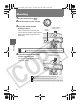
Setting the Language
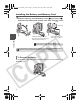
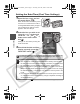
1 Press the (Playback)
button (a).
2 Hold down the FUNC./SET
button (b) and press the
MENU button (c).
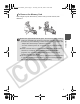
This operation cannot be performed
during movie playback, in the jump
search mode (the Advanced Guide:
p. 90) or while connected to a
separately sold printer.
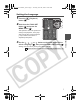
3 Use the , , or button on the multi control dial to
select a language (d), then press the FUNC./SET button (b).
Settings can be made by turning the multi control dial.
Î The date and time can also be set in the Set up menu (the Basic Guide: p. 16).
a
d
b
c
Preparations
01_EC176Basic_E.fm Page 7 Tuesday, June 28, 2005 10:06 AM