
PowerShot S80 Camera User Guide Basic


5
Preparations
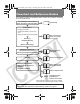
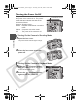
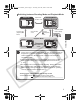
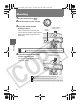
Switching between Shooting Mode and Playback Mode
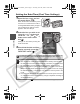
You will hear a start-up sound and see the startup image when the
power comes on (the Advanced Guide: p. 114). However the start-up
image does not appear, nor does the start-up sound play when the
LCD monitor is off in Shooting mode or the A/V OUT terminal is
connected to a TV.
"Card locked!" appears on the LCD monitor when power is turned on,
writing to the memory card is not possible (the Advanced Guide:
p. 127).
Be careful not to touch the lens when shooting. Please also refrain
from forcing the lens with fingers or other objects. It could lead to
malfunctions or damage the camera. If the camera is not operating
correctly, turn the camera off and back on.
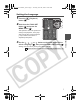
Turning on the camera without the start-up sound
Press and hold the button, then turn on the power.
Press the
(Playback)
button.
Open the lens
cover.
Press the shutter
button halfway.
Press the
(Playback)
button.
Power Off Shooting Mode
Playback Mode
Open/Close
the lens cover.
Close the lens
cover.
Î See the Advanced Guide: Mute settings (p. 29)
01_EC176Basic_E.fm Page 5 Tuesday, June 28, 2005 10:06 AM