
PowerShot S80 Camera User Guide Basic



16
Menus and Settings
Menus and Settings
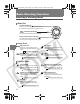
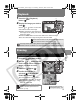
FUNC. Menu
This menu appears when the camera is set to shooting mode and you press the
FUNC./SET button. From this menu you can specify the resolution, compression, and
other settings.
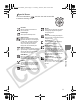
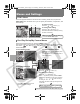
Rec./Play/Set up/My Camera Menus
These menus appear when you press the MENU button.
From these menus you can specify settings related to camera functions. There are
four menus: [ Rec. Menu], [ Play Menu], [ Set up Menu], and [ My
Camera Menu].
Î See the Advanced Guide: FUNC. Menu, Menu list (p. 26)
a b
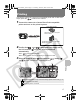
To select an item
Press the or button. (a)
To change the setting
Press the or button. (b)
Selections can also be made by turning
the multi control dial.
When you finish making settings
Press the FUNC./SET button.
b
ca
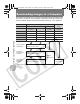
To switch between menus
When the menu icon is selected, press
the or button. (a)
(You can switch using the zoom lever or
multi control dial.)
To select an item
Press the or button. (b)
To change the setting
Press the or button. (c)
When "..." appears by an item, press the
FUNC./
SET
button to display the set up screen, and then
use the , , or button to change
the settings.*
Selections can also be made by turning the multi
control dial.
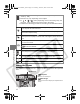
Press the MENU button.
Press the MENU button.
From shooting mode
From playback mode
When you finish making settings
Press the MENU button.
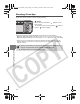
*The FUNC./SET button must be
pressed for some settings.
01_EC176Basic_E.fm Page 16 Tuesday, June 28, 2005 10:06 AM