
PowerShot S80 Camera User Guide Basic



15
Playback
Playback
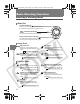
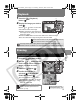
1 Press the (Playback)
button (a).
2 Display the image you wish to
view (b).
Use the or button on the multi
control dial to select the image.
z Holding the button down advances
the images more rapidly, but shows
them less clearly.
z Press the DISP. button to show the data for the selected image.
z You can select the image turning the multi control dial.
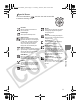
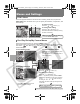
Erasing
1
Press the (Playback) button.
2 Use the or button on the
multi control dial to select the
image you wish to erase.
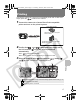
3 Press the button (a)
4 Confirm that [Erase] is
selected (b) and press the
FUNC./SET button (c).
z To exit instead of erasing, select
[Cancel] using the or button.
z You can select the image turning
the multi control dial.
Î
See the Advanced Guide to verify the advanced playback function.
Î
See the Advanced Guide: Viewing Movies (p. 94)
You may not be able to play back images that have been shot with
another camera or edited on a computer with other software applications.
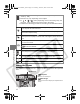
Please note that erased images cannot be recovered. Exercise adequate
caution before erasing an image.
Protected images cannot be erased
with this function (the Advanced
Guide: p. 104).
a
b
ca
b
.
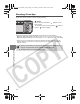
Î
See the Advanced Guide:
Erasing All Images (p. 105)
01_EC176Basic_E.fm Page 15 Tuesday, June 28, 2005 10:06 AM