
PowerShot S80 Camera User Guide Basic



10
Basic Shooting Functions
Basic Shooting Functions
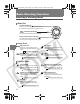
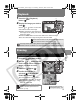
Selecting a Shooting Mode
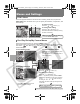
Use the mode dial to switch between the Shooting modes.
Mode Dial
Image Zone
Creative Zone
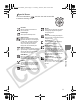
Special Scene
Select from 12 scene modes to shoot
with the most appropriate settings for the
scene.
My Colors
Allows you to change the image colors
easily with 9 modes.
Stitch Assist
Use this mode when taking shots that
you want to combine into a panorama.
Movie
This mode allows you to shoot a movie
by pressing the shutter button.
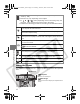
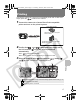
Program AE
Select this mode to have the camera
automatically set the shutter speed and
the aperture.
Shutter-speed priority AE
When you select the shutter speed, the
camera automatically sets the aperture.
Aperture-priority AE Program AE
When you select the aperture, the
camera automatically sets the shutter
speed.
Manual Exposure
Use this mode to select your
preferences for the shutter speed and
the aperture.
Custom
Allows you to save frequently used
shooting modes and various shooting
settings.
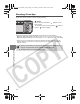
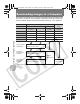
Creative Shooting
Allows you to select settings yourself, such as
the exposure compensation or aperture value.
: Automatic Shooting
The camera automatically selects settings.
Image Composition Shooting
The camera automatically selects settings
according to the image composition type.
Î
See the Basic Guide (p. 10)
Î
See the Advanced Guide (p. 53)
Î
See the Advanced Guide (p. 45)
Î
See the Advanced Guide (p. 41)
Î
See the Advanced Guide (p. 50)
Î
See the Advanced Guide (p. 50)
Î
See the Advanced Guide (p. 51)
Î
See the Advanced Guide (p. 52)
Î
See the Advanced Guide (p. 82)
01_EC176Basic_E.fm Page 10 Tuesday, June 28, 2005 10:06 AM