
PowerShot S80 Camera User Guide Basic


8
Shooting
Shooting
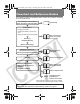
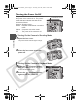
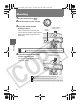
1 Set the mode dial to .
2 Aim the camera at the subject.
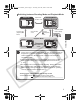
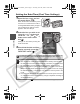
3 Press the shutter button
halfway to focus.
The camera beeps twice when the
camera focuses and the upper indicator
lights green (lights orange when the
flash fires).
4 Press the shutter button fully
(all the way) to shoot.
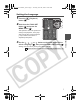
The shutter sound will play and the
image will record.
The beep will sound one time if the subject is difficult to focus on.
Î See the Basic Guide: Basic Shooting Functions (p. 10)
Î See the Advanced Guide: Shooting a Movie (p. 41)
Î See the Advanced Guide to verify the advanced shooting method.
Pressing halfway
(Lightly press)
Upper
indicator
Î See the Advanced Guide: Shooting Problem Subjects for the Autofocus (p. 62)
Pressing fully
(Pressing all the way)
01_EC176Basic_E.fm Page 8 Tuesday, June 28, 2005 10:06 AM