
ImageBrowser 6.0 Software User Guide



Basic Functions
& Features
Contents
Things to
Remember
Mastering
the Basics
More Advanced
Techniques
Appendices
10
Downloading Images
Downloading Images by Connecting the Camera to a Computer
Downloadthecameraimagestothecomputer.
IMPORTANT
•Theinstructionsinthissoftwaremanualassumethatyouhavecorrectlyinstalled
the software. See the guides supplied with your product package for software
installation procedures.
•IfCameraWindowfailstoopenwhenyouconnectthecamera,clickthe
[CameraWindow] icon in the Dock (the bar at the bottom of the desktop).
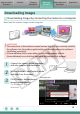
1
Connect the camera to the computer
with the supplied interface cable.
2
Set the camera to the Playback mode
and switch on the power.
3
Click [Transfer Untransferred
Images Automatically].
Theimageswillstartto
download.
CameraWindow