
PowerShot A550 Camera User Guide Basic



5
Preparations
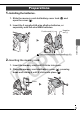
1.
Installing the batteries.
1. Slide the memory card slot/battery cover lock (
a
) and
open the cover (
b
).
2. Insert the 2 supplied AA-size alkaline batteries, or
separately sold AA-size NiMH batteries.
2.
Inserting the memory card.
1. Insert the memory card until it clicks into place.
2. Close the memory card slot/battery cover (
a
), pressing
down and sliding it until it clicks into place (
b
).
Preparations
Î
See the Advanced Guide: Battery Handling (p. 91)
Positive end (+)
Negative
end (–)
Front