
LV-7575 BASIC SERIAL COMMAND FUNCTIONAL SPECIFICATIONS

LV-7575 Basic Serial Command Functional Specifications
17/26
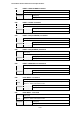
6.39 POINTER RIGHT Command
Command “C3A” [CR]
Detail
Move the Pointer of On-Screen Display Menu to the right.
This command works differently from the command by Point button “>” of the
projector and has no “Volume +” function.
Acceptable [ACK] [CR]
Response
Unacceptable “?” [CR]
6.40 POINTER LEFT Command
Command “C3B” [CR]
Detail
Move the Pointer of On-Screen Display Menu to the left
This command works differently from the command by Point button “<” of the
projector and has no “Volume -” function.
Acceptable [ACK] [CR]
Response
Unacceptable “?” [CR]
6.41 POINTER UP Command
Command “C3C” [CR]
Detail
Move up the Pointer of On-Screen Display Menu
This command works the same way as “▲” button of the projector.
Acceptable [ACK] [CR]
Response
Unacceptable “?” [CR]
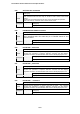
6.42 POINTER DOWN Command
Command “C3D” [CR]
Detail
Move down the Pointer of On-Screen Display Menu
This command works the same way as “▼” button of the projector.
Acceptable [ACK] [CR]
Response
Unacceptable “?” [CR]
6.43 ENTER Command
Command “C3F” [CR]
Detail
This command works the same way as “SELECT” button of the projector and
remote control.
Acceptable [ACK] [CR]
Response
Unacceptable “?” [CR]
6.44 FREEZE ON Command
Command “C43” [CR]
Detail
Freeze on-screen image
This command works the same way as “FREEZE” button of the remote control for
Freeze ON, but does not work for Freeze OFF.
Acceptable [ACK] [CR]
Response
Unacceptable “?” [CR]