BASIC SERIAL COMMAND FUNCTIONAL SPECIFICATIONS LV-7575
LV-7575 Basic Serial Command Functional Specifications Contents 1. Overview.......................................................................................................................... 5 2. Serial Interface Specification......................................................................................... 5 2.1. Transfer Specification.............................................................................................. 5 2.2. Connection ..............................................
LV-7575 Basic Serial Command Functional Specifications 7 6.32 POWER MANAGEMENT CANCEL Command................................................... 15 6.33 POWER MANAGEMENT SHUTDOWN Command ............................................ 16 6.34 D.ZOOM + Command ......................................................................................... 16 6.35 D.ZOOM - Command .......................................................................................... 16 6.36 INPUT 3 VIDEO Command ........
LV-7575 Basic Serial Command Functional Specifications 7.8 Lamp Mode Read Command .............................................................................
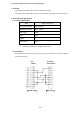
LV-7575 Basic Serial Command Functional Specifications 1. Overview ・ These specifications define projector control commands for LV-7575. ・ The projector control commands are used to control a projector through RS-232C from a computer. 2. Serial Interface Specification 2.1.
LV-7575 Basic Serial Command Functional Specifications 3. Notes for Communication ・ The projector command is defined as one command per line that starts with “C” and ends with carriage return (0x0D). ・ When carriage return (0x0D) is received, decoding starts. ・ There are two types of commands; Functional Execution Commands which function in a way comparable to remote and console keys and Status Read Commands which get basic statuses of projector.
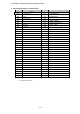
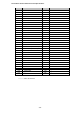
LV-7575 Basic Serial Command Functional Specifications 4.
LV-7575 Basic Serial Command Functional Specifications Command Item Command Item C40 --- C80 --- C41 --- C81 --- C42 --- C82 --- C43 FREEZE ON C83 --- C44 FREEZE OFF C84 --- C45 --- C85 --- C46 ZOOM - C86 --- C47 ZOOM + C87 --- C48 --- C88 --- C49 --- C89 AUTO PC ADJ C4A FOCUS - C8A PRESENTATION TIMER C4B C4C FOCUS + C8B --- --- C8C --- C4D --- C8D --- C4E COLOR MANAGEMENT C8E KEYSTONE ↑ C4F --- C8F KEYSTONE ↓ C50 INPUT 1 ANALOG RGB C90
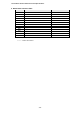
LV-7575 Basic Serial Command Functional Specifications 5. Status Read Command Table Command Item CR0 STATUS READ CR1 INPUT MODE READ CR2 --- CR3 LAMP TIME READ CR4 SETTING READ CR5 --- CR6 TEMP READ CR7 LAMP MODE READ CR8 --- CR9 --- CRA --- CRB --- CRC --- Note “———“ means “No Function”.
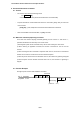
LV-7575 Basic Serial Command Functional Specifications 6. Functional Execution Command 6.1 Format ・ PC issues a command in the following format: “C” Command [CR] Command: two characters (See Functional Execution Command Table) ・ Projector decodes the received data and returns the result when getting ready to receive the next command. [ACK] [CR]:(0x06, 0x0D) When received Functional Execution Commands. ・ When received data cannot be decoded, “?” [CR] is returned. 6.
LV-7575 Basic Serial Command Functional Specifications 6.4 Operation Requirements In the following status of projector, Available Functional Execution Commands are limited.
LV-7575 Basic Serial Command Functional Specifications 6.8 INPUT 1 Command Command “C05” [CR] Detail Select Input 1. This command works differently from the command by “Input 1” key of the remote control. When Input 1 has been already selected, this command does not execute the source switching; just for switching to Input 1. Response Acceptable [ACK] [CR] Unacceptable “?” [CR] 6.9 INPUT 2 Command Command “C06” [CR] Detail Select Input 2.
LV-7575 Basic Serial Command Functional Specifications 6.14 SOUND MUTE ON Command Command “C0B” [CR] Detail Sound Mute ON This command works the same way as “MUTE” button of the remote control for Mute ON, but does not work for Mute OFF. Response 6.15 Acceptable [ACK] [CR] Unacceptable “?” [CR] SOUND MUTE OFF Command Command “C0C” [CR] Detail Sound Mute OFF This command works the same way as “MUTE” button of the remote control for Mute OFF, but does not work for Mute ON. Response 6.
LV-7575 Basic Serial Command Functional Specifications 6.20 MENU ON Command Command “C1C” [CR] Detail Display On-Screen Display Menu Response 6.21 Acceptable [ACK] [CR] Unacceptable “?” [CR] MENU OFF Command Command “C1D” [CR] Detail Clear On-Screen Display Menu Response 6.22 Acceptable [ACK] [CR] Unacceptable “?” [CR] DISPLAY CLEAR Command Command “C1E” [CR] Detail Clear On-Screen Display Clear On-screen Display under all conditions Response 6.
LV-7575 Basic Serial Command Functional Specifications 6.27 INPUT 2 RGB Command Command “C25” [CR] Detail Select RGB input in Input 2 Response 6.28 Acceptable [ACK] [CR] Unacceptable “?” [CR] IMAGE Command Command “C27” [CR] Detail Switch Image Setting status This command works the same way as “IMAGE” button on the projector or remote control. Response 6.
LV-7575 Basic Serial Command Functional Specifications 6.33 POWER MANAGEMENT SHUTDOWN Command Command “C2E” [CR] Detail Set Power Management function to Shutdown mode. This status is stored in EEPROM and retained regardless of Power OFF/ON operation. Response 6.34 Acceptable [ACK] [CR] Unacceptable “?” [CR] D.ZOOM + Command Command “C30” [CR] Detail Enter Digital Zoom mode and expand image size This command works the same way as “D.ZOOM ▲” button of the remote control. Response 6.
LV-7575 Basic Serial Command Functional Specifications 6.39 POINTER RIGHT Command Command “C3A” [CR] Detail Move the Pointer of On-Screen Display Menu to the right. This command works differently from the command by Point button “>” of the projector and has no “Volume +” function. Response 6.
LV-7575 Basic Serial Command Functional Specifications 6.45 FREEZE OFF Command Command “C44” [CR] Detail Cancel Freeze mode This command works the same way as “FREEZE” button of the remote control for Freeze Off, but does not work for Freeze ON. Response 6.46 Acceptable [ACK] [CR] Unacceptable “?” [CR] ZOOM + Command Command “C47” [CR] Detail Expand image size This command works the same way as “ZOOM ▲” button of the remote control. Response 6.
LV-7575 Basic Serial Command Functional Specifications 6.51 INPUT 1 ANALOG RGB Command Command “C50” [CR] Detail Select Analog RGB input in Input 1 Response 6.52 Acceptable [ACK] [CR] Unacceptable “?” [CR] INPUT 1 SCART Command Command “C51” [CR] Detail Select SCART input in Input 1 Response 6.53 Acceptable [ACK] [CR] Unacceptable “?” [CR] INPUT 1 DVI (PC DIGITAL) Command Command “C52” [CR] Detail Select DVI (PC Digital) input in Input 1 Response 6.
LV-7575 Basic Serial Command Functional Specifications 6.58 AUTO PC ADJ. Command Command “C89” [CR] Detail Execute AUTO PC ADJ. function This command works the same way as “AUTO PC ADJ.” button of the remote control. Sending this command during Auto PC Adj. process terminates the operation. This is the same by “AUTO PC” button of the remote control. Response 6.
LV-7575 Basic Serial Command Functional Specifications 6.63 KEYSTONE ← Command Command “C91” [CR] Detail Correct keystone distortion by reducing left side of image. This command invokes both operations of keystone distortion correction and OSD display, regardless of whether the “KEYSTONE” OSD has been already displayed or not.
LV-7575 Basic Serial Command Functional Specifications 7 Status Read Command 7.1 Format ・ PC issues a command in the following format. “CR” Command [CR] Command: one character (See Status Read Command Table) ・ When projector receives an appropriate command, it returns the required data in string. Required Data [CR] Required Data: string (See Status Read Command Table) ・ When the received data cannot be decoded, the projector returns “?” [CR] is returned. 7.
LV-7575 Basic Serial Command Functional Specifications ・ “80” [CR] Status: Standby When the status is Standby, Status Read Commands are always accepted, but any Functional Execution Commands are not accepted except for POWER ON command. ・ “40” [CR] Status: Countdown in process When “Display” in Setting Menu is set to ON, Countdown operation is started by execution of POWER ON; while “Display” in Setting Menu is set to OFF, the status moves directly to Power ON without Countdown operation.
LV-7575 Basic Serial Command Functional Specifications projector clears the information of Abnormal Temperature and normal operation starts. ・ “24” [CR] Status: Power-Save Cooling Down in process This indicates Power Management in the Setting menu is enabled and Power-Save Cooling Down operation is in process. During this time, any Functional Execution Command is invalid. In this Power-Save Cooling Down function, the status moves to Power Save after the given Cooling down operation.
LV-7575 Basic Serial Command Functional Specifications 7.4 Input Mode Read Command Command “CR1” [CR] Detail Get currently selected Input No. Acceptable Response %1 “%1” [CR] ”1” = Input 1 is selected. “2” = Input 2 is selected. “3” = Input 3 is selected. “4” = Input 4 is selected.(only for Networking-capable models) Unacceptable “?” [CR] 7.5 Lamp Time Read Command Command “CR3” [CR] Detail Get total lamp running hours.
LV-7575 Basic Serial Command Functional Specifications 7.8 Lamp Mode Read Command Command “CR7” [CR] Detail Get lamp mode. In the projector with single lamp, get ON/OFF status of the lamp Acceptable Response %1 Unacceptable “%1” [CR] “00” [CR] = Lamp is ON. “01” [CR] = Lamp is OFF.