
LV7565_Basic_Command_Specification

Basic Serial Command Specification Page 20 of 20
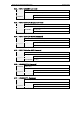
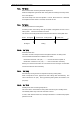
7.4. Input Mode Read Command
Command “CR1” [CR]
Detail Read selected Input No.
Acceptable “%1” [CR]
%1
”1” = Input 1 is selected
“2” = Input 2 is selected
“3” = Input 3 is selected
“4” = Input 4 (Network Viewer) is selected
Response
Unacceptable “?” [CR]
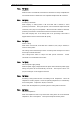
7.5. Lamp Time Read Command
Command “CR3” [CR]
Detail Read total lamp running hours.
Acceptable “%1” [CR]
%1
Show as 4 digits
Ex.: “0410” [CR] --------- 410 hours
Response
Unacceptable “?” [CR]
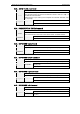
7.6. Setting Read Command
Command “CR4” [CR]
Detail Read setting status for screen such as Ceiling / Rear.
Acceptable “%1” [CR]
%1
“11” [CR] = Normal Screen Setting
“10” [CR] = Rotation around the horizontal setting
(Rear & Ceiling ON)
“01” [CR] = Rotation around the horizontal setting
(Rear ON)
“00” [CR] = Vertical and right-and left (four directions)
reversal setting (status: Ceiling ON)
Response
Unacceptable “?” [CR]
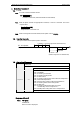
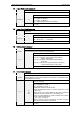
7.7. Temp Read Command
Command “CR6” [CR]
Detail
Read the temperature inside a Projector.
Some temperature sensors are installed in the Projector, it is possible to know
the temperature all at once.
Acceptable “%1_%2_%3” [CR]
%1
%2
%3
%1 = Temperature, sensor 1
%2 = Temperature, sensor 2
%3 = Temperature, sensor 3
Temperature data form shows as 00.0.
When the temperature sinks to -, the first character is “-“ like
“-05.5” [CR].
When cannot return the temperature data due to hardware
problems, the first character is “E” like “E00.0” [CR].
There are some temperature sensors installed, the Projector
sends command continuously.
“_31.5__35.2__33.4” [CR]
There is the first sensor’s information, and after one space,
there is the second sensor’s information.
Response
Unacceptable “?” [CR]