
LV7565_Basic_Command_Specification

Basic Serial Command Specification Page 19 of 20
7.3.8. “88” [CR]
Normal status after recovering abnormal temperature.
When the temperature goes down after cooling down and moving to stand by status,
this is the response.
This status keeps until the next operation. In short, when Power On is executed,
the temperature information is canceled, and works normal.
7.3.9. “24” [CR]
Processing Power Save-Cooling Down
Processing Power Save-Cooling down by the power management function in the e
setting menu. The control command is invalid.
This Power Save-Cooling Down moves to Power Save after the cooling down time.
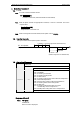
Status: No Signal Power Save - Cooling Down Power Save
Response: “00” “24” “04”
No Signal Cooling
7.3.10. “04” [CR]
Status of Power Save
The status is Power Save by the Power management function in setting menu.
Control commands as below are available in this status.
*Power ON Command: “C00” [CR] ----------- move on the status of power on
*Power OFF Command: “C01” [CR] --------- move on the status of stand by
Moving on to the status of Power On is the same action as moving on to the Power
On from the status of normal stand by.
7.3.11. “21” [CR]
Automatically turning off due to a lamp failure (During cooling down).
When a lamp failure occurs, projector will start cooling down automatically. The
return command is “21” [CR]. During processing cooling down, the command, “21”
[CR] stays.
7.3.12. “81” [CR]
Standby status after recovering lamp failure.
This is the return command after cooling down and moving on to standby status.
The Standby status stays until next command is issued.
In short, when executes Power On, the lamp information is cancelled and projector
performs as usual.