
LV7565_Basic_Command_Specification

Basic Serial Command Specification Page 14 of 20
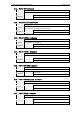
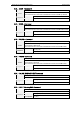
6.46. ZOOM + Command
Command “C47” [CR]
Detail
Make the screen zoom up.
This command works the same as the Remote Control’s “ZOOM Up” button.
Acceptable [ACK] [CR]
Response
Unacceptable “?” [CR]
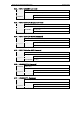
6.47. ZOOM - Command
Command “C46” [CR]
Detail
Make the screen zoom down.
This command works the same as the Remote Control’s “ZOOM Down” button
Acceptable [ACK] [CR]
Response
Unacceptable “?” [CR]
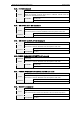
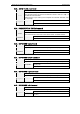
6.48. FOCUS + Command
Command “C4B” [CR]
Detail
Focus on the screen image (sharp and clear) with a long- focal- length (the
lens direction is backward).
This command works the same as the Remote Control’s “FOCUS▲” button.
Acceptable [ACK] [CR]
Response
Unacceptable “?” [CR]
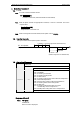
6.49. FOCUS - Command
Command “C4A” [CR]
Detail
Focus on the screen image (sharp and clear) with a short- focal- length (the
lens direction is forward).
This command works the same as the Remote Control’s “FOCUS▼” button.
Acceptable [ACK] [CR]
Response
Unacceptable “?” [CR]
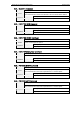
6.50. COLOR. MANAGEMENT Command
Command “C4E” [CR]
Detail Set Color Management to ON.
Acceptable [ACK] [CR]
Response
Unacceptable “?” [CR]
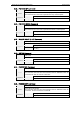
6.51. INPUT 1 Analog RGB Command
Command “C50” [CR]
Detail Select Analog RGB Input for Input 1
Acceptable [ACK] [CR]
Response
Unacceptable “?” [CR]