
Manual



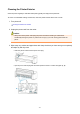


Check that the printer power is on. Then press the tank cover open button on the printer and open the
tank cover.
Check the following items for each ink.
•
Is there ink remaining in the tank?
•
Did you push in the ink tank completely until you heard a clicking sound?
• If the orange tape is there, has it been peeled off completely?
Any remaining tape will hinder ink output.
• Did you install the ink tanks in their correct positions?
In addition, System Cleaning consumes an extremely large amount of ink.
Before executing this function, check the items below. Then, if you feel it necessary, execute System
Cleaning.
•
Did you use Nozzle Check to check the nozzle status and was there a problem?
•
Did the status remain unchanged even after Cleaning was executed?
3.
Execute system cleaning
Make sure that the printer is on and then click OK.
System cleaning starts.
Important
• System Cleaning consumes an extremely large amount of ink.
Executing system cleaning frequently will rapidly deplete your printer's ink supply. Therefore, execute
system cleaning only when necessary.
Note
• When Cleaning or System Cleaning is complete, perform a Nozzle Check and confirm the results
of cleaning.
Related Topic
Printing a Nozzle Check Pattern
332