imagePROGRAF PRO-6000S series (PDF) User Manual (Windows)
Manuals
Brands
Canon Manuals
large format printers
imagePROGRAF PRO-6000S
81
82
83
84
85
86
87
88
89
90
Note
•
If the Home screen does not appear
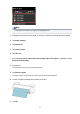
, tap the
Home
button.
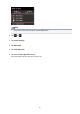
2.
T
ap
or
.
3.
T
ap
Paper settings
.
4.
T
ap
Advanced
.
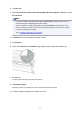
5.
T
ap
T
rim edge first
.
6.
T
ap desired
T
rim edge first
settings.
This setting takes effect the next time you load a roll.
88
1
...
...
86
87
88
89
90
...
...
953